
Affiliate Marketing for Seniors
How to Create a Lead Magnet
A Lead Magnet, sometimes called an Ethical Bribe, is something valuable that you give away to a visitor to your website in exchange for their name and email address.
You add their details to your list, which you can then send emails too.
Someone who has interacted with you in this manner is much more likely to buy a relevant, high-value affiliate product that you promote to them than a random visitor to your site. It's an online marketing truism that "the money is in the list".
If you're serious about building an affiliate marketing for seniors online income, then you must also be serious about building your list.
Which means learning how to create a lead magnet is an essential skill.
I'm going to give you an example that you can follow through to see how it all works and then I'll explain how each step was crafted.
Here's a Lead Magnet I created for this website, superaffiliatechallenge.com.
Affiliate Marketing for Seniors Lead Magnet
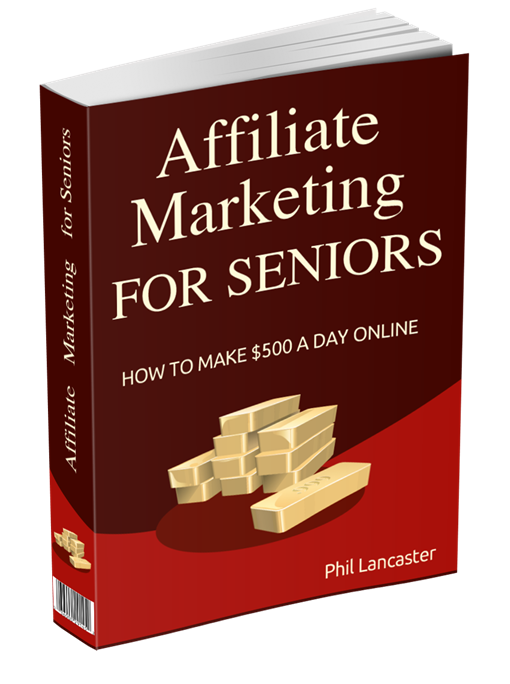
E-Book
As you can see, this is an e-book titled Affiliate Marketing for Seniors, with the tempting sub-title How to Make $500 a Day Online, so if you're in my target audience (people approaching or already in retirement and considering affiliate marketing as a side hustle to fix their financial woes) it's probably a book you want.
Especially as it's free.
Here's a link to the page on Super Affiliate Challenge where the e-book is offered.
Affiliate Marketing for Seniors: Offer
This page shows the book cover to the visitor and then introduces it with this text:
"Affiliate Marketing is the ideal side hustle for seniors looking to fund a comfortable, enjoyable retirement and this book will teach you how to get there. Its 10 chapters cover the things you need to know and where to find more training on the things you don't."
This is followed by a brief blurb about each of the 10 chapters, designed to whet the reader's appetite and encourage them to get the book. This is followed by the form where they enter their name and email address and then click the button to request the book.
After the visitor clicks the button, they are taken to a thank-you page where they can download the book.
By all means, do it now, so you can see the process in action. Go to Affiliate Marketing for Seniors: Offer.
What Happens in the Background?
While you are seeing the page to download the book, my autoresponder is adding your details to my list, sending me an email to let me know I have a new sign-up, sending you a welcome email containing links to other free products and adding you to an email automation that will start sending you a series of (hopefully, interesting and valuable) emails.
All of this happens automatically. I put in the work just once to set it all up and now it takes place with no further input on my part.
In fact, I could be asleep while it's all happening!
All the Moving Parts
Here's what you need to put all this together:
- Your own website (obviously). Check out Affiliate Marketing for Seniors: How to Build a Website.
- Your Lead Magnet. I detail how to build your Affiliate Marketing for Seniors Lead Magnet further down in this article. It also needs an attractive cover.
- A way to upload your Lead Magnet to your website and make it available to your subscribers for downloading. I use FileZilla or the file handler built into my web host SiteGround.
- An Autoresponder. I use Active Campaign but other popular autoresponders are AWeber, Get Response and MailChimp.
- Something to create the form that collects your visitor's name and email address. I use one of the many form templates provided by the Thrive Suite (which I heartily recommend for its theme builder, drag n drop editor and so much more) but it's a paid plugin and your autoresponder will provide one for no extra cost.
Create Your Lead Magnet

Anti-Aging Skin Care
I have another website in the anti-aging niche and this cover is one I created for an e-book on Skin Care.
You can get it if you're interested at Skin Care: Look After Your Body's Largest Organ.
Like all of my Lead Magnet e-books, it was created with the help of AI.
AI has made creating an e-book much easier, as long as you use it as an assistant, not as the author.
You are the author!
I use ChatGPT4. Here's how I go about it.
Create a Word Template
This is something I did years ago.
I use it not only for my Lead Magnet e-books, but also for my Kindle and paperbook books published on Amazon.
It complies with Amazon's requirements with regard to such things as size and fonts, it contains a Title page, a copyright message, a disclaimer, a Table of Contents and an About the Author page.
Fonts, sizes and alignment for Chapters, Headings and Paragraphs are pre-defined.
It has saved me huge amounts of time and grief over the years. I can take any text, copy and paste it into the template and I have an instant e-book (or Amazon Kindle, Paperback or Hardback).
It's a gift that I'm happy to give it to anyone.
Think of a Title
First, decide what your e-book Lead Magnet is going to be about and give it a relevant title.
So for mine, I chose Affiliate Marketing for Seniors. Not very imaginative, but it tells my visitor exactly what they can expect.
You'll notice there's a catchy sub-title How to Make $500 a Day Online. I didn't think that one up. It came about as a by-product of designing the cover. More on that later.
Ask AI to Create Chapter Headings
I prompted ChatGPT4 with something like "I'm writing an e-book titled Affiliate Marketing for Seniors. Please create 10 relevant chapter headings." You could, of course, specify any number of chapters, but I wanted a fairly substantial book, so I chose 10. You don't have to use them all. Sometimes just seeing the suggestions will spark some new ideas.
Ask AI to Write the Text for One Chapter
Remember that you are having a conversation with ChatGPT, so there's no need to repeat what's gone before.
Prompt it with something like "Please write 4 paragraphs for Chapter 1." The AI will do exactly that and they'll be pretty good. Note:
- There's no need to say "please" or use proper punctuation. That's just me.
- You can ask ChatGPT to use different "voices", such as academic or humorous. By all means experiment until you find one that suits your style.
- Don't just accept what it provides. Reword where required (often to remove over-formality) and add additional information where it would help.
Complete All the Chapters
Repeat the above prompt for all the other chapters. But always do a final proof-read, once all chapters are complete. Those last few tweaks can make all the difference to your lead magnet's quality.
Publish Your Lead Magnet
Save your Word doc as a PDF. Then it's ready to be uploaded to your website, ready to be downloaded by a visitor in exchange for their name and email address.
Upload Your Lead Magnet to Your Website
As I said earlier, I use FileZilla or SiteGround for this. You can click on the link to download the FileZilla client. It's totally free.
FileZilla uses FTP (File Transfer Protocol) to transfer files between your local computer and your website.
It uses a familiar File Explorer type interface, with your local computer's file structure in the left-hand pane and your website's file structure in the right-hand pane.
Simply double-click on the file you want to transfer (such as your lead magnet's PDF) and it is uploaded to your website. I normally create a new directory in my website called free-product and upload my Lead Magnets to it.
For security, FTP transfer requires a user name and password. This is not required for a SiteGround file transfer as you will already be logged in securely.
Create a Cover for Your Lead Magnet

Never Judge a Book ...
There's an old saying "never judge a book by its cover" but that assumes a printed book that does, in fact, have a cover.
Although your Lead Magnet is an e-book, people still want to see a cover.
We are all so conditioned by this that we need to see a cover in order to be convinced that the book is "real".
Here's one I created for yet another Lead Magnet on my anti-aging site, which includes landing pages and reviews for several collagen supplements. You can see it at Collagen: Nature's Anti-Aging Miracle.
All of my covers have been created by Pixel Studio. I've been a member there for many years. They have a huge number of templates in a large number of categories and any one can be presented in various formats, such as the slightly open book shown here, but also magazines, book stacks, DVDs, product boxes and different orientations, such as standing up, lying down or scattered.
The real magic lies in the fact that everything on the cover is in editable layers, so that you can easily change words, fonts, sizes, colors and images. This means that you don't have to be concerned with what's on the original cover. Just find one you like the look of and change it to match your Lead Magnet. I don't remember what this cover was about originally, but it certainly wasn't collagen!
When you're happy with the cover, just click the Download button, and you'll get a zip file containing the image as a PNG in three different sizes (imaginatively named Small, Medium and Large).
Your Lead Magnet's Landing Page
In this article, you've already been able to click on landing pages for three of my lead magnets, so should have a good idea of their structure.
Essentially, I create a page that contains the book's cover, some text designed to convince the reader of its value and the form that collects the visitor's name and email address.
The form can be provided by your autoresponder, although I use one of the templates provided by the Thrive Suite. It's connected to the autoresponder (in my case, Active Campaign) so that the details get added to my list and also adds a tag that triggers the series of emails defined by an automation in the autoresponder.
I'll cover just how all this is done in a subsequent blog post in this topic cluster.
Conclusion
Lead Magnets are an advanced topic in the subject of Affiliate Marketing for Seniors. You may prefer to ignore them until you have the basics mastered. But they are very worthwhile to implement when you are ready to build your list and start email marketing to it.
See Also
Is Affiliate Marketing the Ideal Side Hustle for Seniors?
Affiliate Marketing for Seniors Work Flow
Affiliate Marketing for Seniors: How to Build a Website
Affiliate Marketing for Seniors: Create Content
Affiliate Marketing for Seniors: Your Lead Magnet's Landing Page
Successful Affiliate Marketing for Seniors and Retirees in the USA